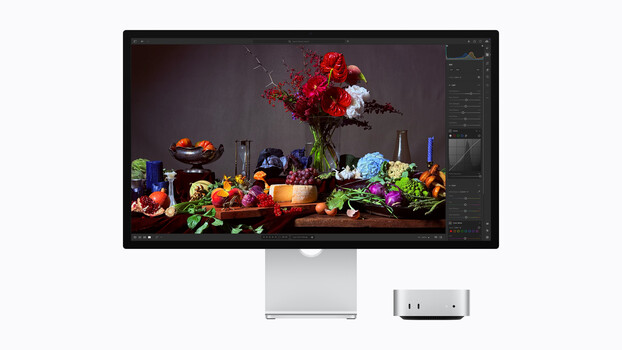
Apple’s new Studio Display XDR replaces the Pro Display XDR with a 27-inch 5K mini-LED panel, 2,000 nits peak HDR brightness, 120 Hz refresh rate, and dual color space support for video and design work.
Apple has announced a refreshed Studio Display and an entirely new Studio Display XDR, replacing the aging Pro Display XDR and giving Mac users two tiers of external monitor to choose from.
Studio Display
The updated Studio Display keeps the same 27-inch, 5K (5,120 x 2,880) panel running at 60 Hz with 600 nits of brightness and P3 wide color. In other words, the display itself hasn’t changed. What has changed is the camera, audio, and connectivity.
The built-in webcam is now a 12 MP Center Stage camera with support for Desk View, which shows a simultaneous top-down view of your workspace during video calls. The six-speaker sound system has also been updated, with Apple claiming 30 percent deeper bass from the woofers compared to the previous generation. The three-microphone array appears to be unchanged.
On the connectivity front, the Studio Display now features two Thunderbolt 5 ports (up to 120 Gb/s) and two USB-C ports (up to 10 Gb/s). One upstream Thunderbolt 5 port provides 96 W of pass-through charging to a connected Mac laptop via the included Thunderbolt 5 Pro cable. The downstream Thunderbolt 5 port enables daisy-chaining, and Apple says you can connect up to four Studio Displays from a single MacBook Pro with M5 Max for a combined total of nearly 60 million pixels.
The Studio Display starts at $1,599 with a tilt-adjustable stand. A tilt-and-height-adjustable stand and a VESA mount adapter are available as upgrades. Nano-texture glass is a $300 option.
Studio Display XDR: The Pro Display XDR Replacement
The Studio Display XDR is the more significant product here and serves as a direct replacement for the Pro Display XDR, which has been discontinued. It is a smaller and lower-resolution display than its predecessor (27-inch 5K versus 32-inch 6K), but it is also significantly brighter, more feature-rich, and considerably less expensive.
The panel is a 27-inch 5K Retina XDR display (5,120 x 2,880, 218 pixels per inch) with a mini-LED backlight featuring 2,304 local dimming zones. It delivers up to 1,000 nits of sustained SDR brightness (double that of the old Pro Display XDR) and 2,000 nits of peak HDR brightness (25 percent brighter than its predecessor), with a 1,000,000:1 contrast ratio. Apple says the local dimming zones are precise enough to virtually eliminate halo and blooming artifacts.
The display runs at 120 Hz with Adaptive Sync support, which dynamically adjusts the refresh rate between 47 Hz and 120 Hz. This is a notable upgrade for users working with motion content, gaming, or 3D rendering, where lower input lag and smoother frame delivery matter. However, the 120 Hz refresh rate requires a Mac with an M2 Pro chip or newer. Macs with M1, M1 Pro, M1 Max, M1 Ultra, M2, or M3 chips are limited to 60 Hz, and Intel Macs are not supported at all.
Color performance is a major selling point. The Studio Display XDR supports both P3 and Adobe RGB wide color gamuts from the same default preset, meaning users who frequently switch between color spaces for video, print, or design work do not need to manually change reference modes. Apple says this results in more than 80 percent coverage of the Rec. 2020 color space for HDR video editing and color grading. A variety of reference modes cover HDR, HDTV, NTSC, PAL, SECAM, Digital Cinema, and more.
Apple has also introduced DICOM medical imaging presets and a Medical Imaging Calibrator app on macOS, which is pending FDA clearance. When available, this will allow radiologists to use the Studio Display XDR for viewing diagnostic images, offering a more versatile alternative to single-purpose medical displays. Apple notes this is not intended for mammography.
The camera, audio, and connectivity mirror the standard Studio Display with a few key differences. The 12 MP Center Stage camera with Desk View and the studio-quality three-microphone array are the same. The six-speaker system with Spatial Audio is shared across both models. The Studio Display XDR also has two Thunderbolt 5 ports and two USB-C ports, but the upstream Thunderbolt 5 port delivers 140 W of charging power (versus 96 W on the standard model), enough to fast-charge a 16-inch MacBook Pro.
The Studio Display XDR includes a tilt-and-height-adjustable stand by default, with 105 mm of height adjustment and 30 degrees of tilt. An optional VESA mount adapter is available. The stand is made from 100 percent recycled aluminum, and the standard glass option contains 80 percent recycled glass.
Pricing for the Studio Display XDR starts at $3,299, with nano-texture glass available for $300 more. The education price is $3,199. For context, the original Pro Display XDR started at $4,999.
Key Specs: Studio Display
27-inch 5K Retina display (5,120 x 2,880), 218 pixels per inch
60 Hz refresh rate
600 nits brightness
P3 wide color
12 MP Center Stage camera with Desk View
Studio-quality three-microphone array
Six-speaker sound system with Spatial Audio
Two Thunderbolt 5 ports (up to 120 Gb/s), 96 W upstream charging
Two USB-C ports (up to 10 Gb/s)
Standard glass or nano-texture glass (+$300)
Tilt-adjustable stand included; tilt-and-height-adjustable stand and VESA mount adapter available
Starting price: $1,599 ($1,499 education)
Key Specs: Studio Display XDR
27-inch 5K Retina XDR display (5,120 x 2,880), 218 pixels per inch
Mini-LED backlight with 2,304 local dimming zones
120 Hz refresh rate with Adaptive Sync (47 Hz to 120 Hz)
1,000 nits sustained SDR brightness, 2,000 nits peak HDR brightness
1,000,000:1 contrast ratio
P3 and Adobe RGB wide color gamuts, over 80 percent Rec. 2020 coverage
1 billion colors
DICOM medical imaging presets (Medical Imaging Calibrator pending FDA clearance)
12 MP Center Stage camera with Desk View
Studio-quality three-microphone array
Six-speaker sound system with Spatial Audio
Two Thunderbolt 5 ports (up to 120 Gb/s), 140 W upstream charging
Two USB-C ports (up to 10 Gb/s)
Standard glass or nano-texture glass (+$300)
Tilt-and-height-adjustable stand included (105 mm height range); VESA mount adapter available
Starting price: $3,299 ($3,199 education)
Why This Matters for Photo and Video Creators
For photographers and videographers, the quality of your external display directly affects the accuracy of every editing decision you make, from white balance and exposure adjustments to color grading and retouching. The Studio Display XDR is particularly relevant here. Its support for both P3 and Adobe RGB from a single preset eliminates the friction of switching reference modes when moving between workflows, whether you are editing photos destined for print in Adobe RGB or grading video in P3. More than 80 percent Rec. 2020 coverage makes it a capable reference display for HDR video work, which is increasingly becoming the standard delivery format for streaming and broadcast content.
The 2,000 nits of peak HDR brightness and 1,000,000:1 contrast ratio give the display enough dynamic range to accurately represent HDR content as it will appear to end viewers, which is something that many monitors in this price range cannot do. For anyone doing color-critical work, whether photo editing, video color grading, print proofing, or VFX compositing, having a properly calibrated display with wide gamut coverage and high dynamic range is no longer optional. It is the baseline expectation.
The 120 Hz refresh rate and Adaptive Sync also benefit video editors and motion graphics artists working with high-frame-rate content or scrubbing through timelines, where smoother rendering reduces eye strain and makes it easier to evaluate motion.
The Thunderbolt 5 connectivity simplifies studio setups considerably. A single cable to your MacBook Pro handles both the display signal and up to 140 W of charging, and you can daisy-chain additional displays or connect high-speed storage from the monitor’s downstream port. For photographers and filmmakers who work with large raw files, high-bitrate video, and fast external drives, this kind of streamlined connectivity reduces desk clutter and eliminates the need for a separate dock.
The standard Studio Display, while a more modest update, remains a solid option for creators who do not need HDR-level performance but want a high-quality 5K panel with a good webcam and clean Thunderbolt 5 connectivity for their editing setup.
Final Thoughts